
What Is Visa Resolve Online (VROL)? A Merchant's Guide


Visa Resolve Online (VROL) is Visa's case-management platform. Issuers and acquirers use it to document, process, and resolve card disputes. It auto-assigns case liability for about 80% of disputes in its Allocation workflow. Merchants reach it only through their acquirer.
The first thing I check on a merchant's chargeback problem is the billing descriptor. On my own stores, fixing what customers saw on their statement did more than any alert ever did. A charge nobody recognizes is a chargeback waiting to happen, and VROL is where that dispute lands once it's filed.
This guide covers what VROL does, who can use it, and how it differs from the tools it gets confused with.
Key takeaways
What is Visa Resolve Online?
Visa Resolve Online is the platform issuers and acquirers use to research transactions, share dispute documents, and process chargebacks on Visa cards. According to Visa's own developer page, it auto-assigns case liability for about 80% of disputes, which cuts review time.
Your job is to submit transaction records and evidence when your acquirer asks for them.
_%20A%20Merchant_s%20Guide.png)
The platform keeps transaction research, documents, and fraud reports in one place. Your acquirer and the cardholder's issuer both work from the same case file. That's faster than trading emails, and fewer things fall through the cracks.
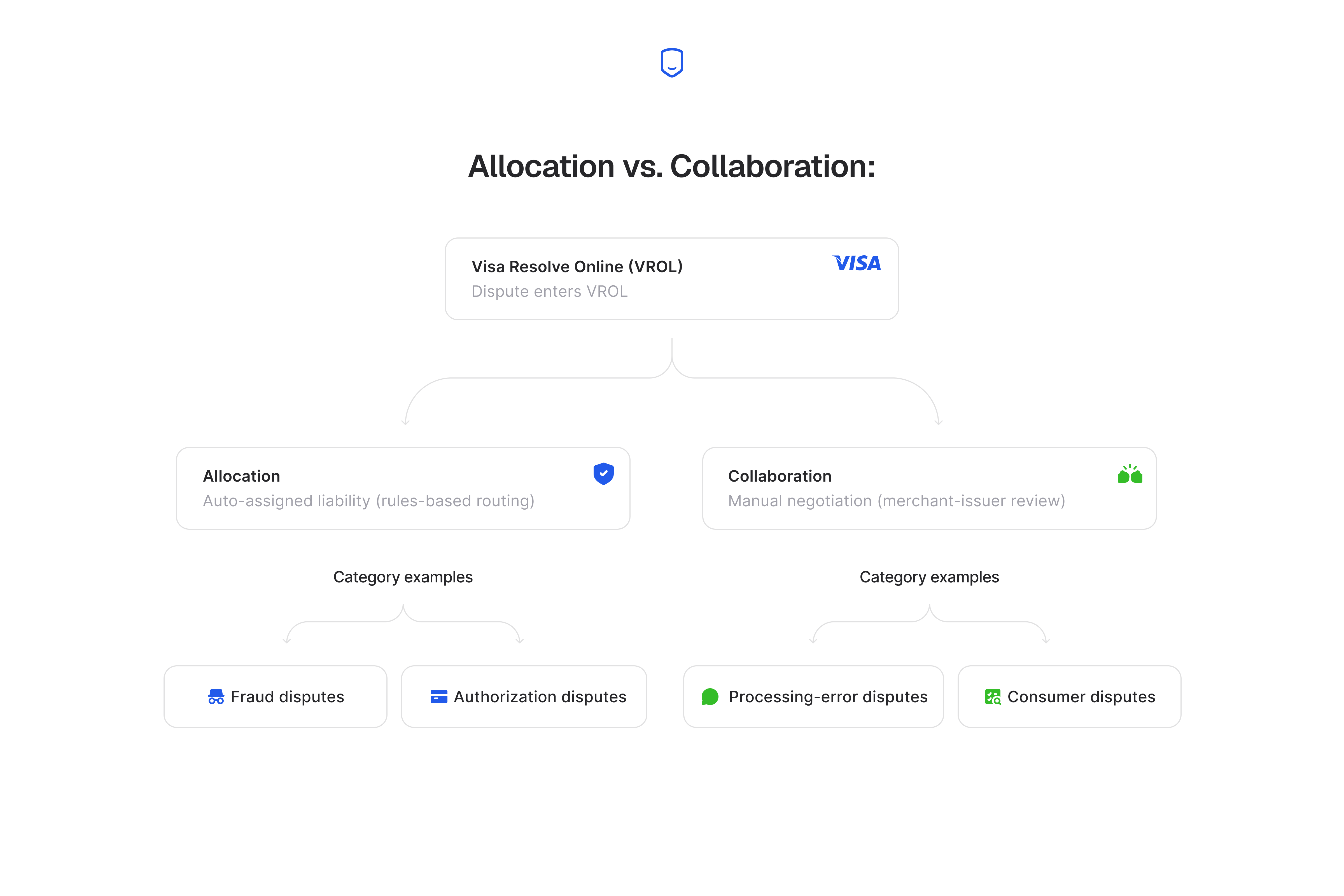
That figure, according to Visa, covers Visa's Allocation workflow only. Disputes in the Collaboration workflow, like processing errors and some consumer disputes, still need manual review. The percentage doesn't cover them.
Who can access Visa Resolve Online?
Merchants never log into VROL. Visa built the platform for issuers and acquirers. Your acquirer enrolls you and routes disputes into the system for you.
The login portal at secure.visaonline.com is for enrolled issuer and acquirer staff only. You reach VROL through the dispute interface your acquirer or processor puts on top of it. What you see is your processor's dashboard, and VROL runs underneath it.
One number gets mistaken for a VROL access line. Visa's dispute contact line at 800-847-2911 takes cardholder and general dispute questions. VROL enrollment still runs through your acquirer.
The 4-step VROL access path
Getting set up to manage disputes through VROL runs four dependent steps. You contact your acquirer, enroll, integrate and test, then manage live disputes. Each step gates the next, so you can't skip ahead. An acquirer can't enroll a merchant it hasn't confirmed.
Integration testing can't start before enrollment finishes. The four steps below run in that order.
Step 1: Contact your acquirer
Ask your acquirer or processor whether they route Visa disputes through VROL and how they want you to work them. Your acquirer holds your merchant account and connects you to Visa. That's why it controls every later step.
If you don't know who your acquirer is, your processor's support team can tell you. Skip this and you have nothing to enroll into.
Step 2: Enroll
Once your acquirer confirms setup, they enroll your merchant account so your disputes route into the case system. Your acquirer does this, not you, so there's no form to file with Visa. The pitfall is assuming you enroll yourself.
Chasing a direct Visa signup wastes days you could spend preparing evidence.
Step 3: Integrate and test
Your processor connects your transaction and evidence data to its dispute interface, then runs test cases before a real dispute flows through. This confirms your order records, delivery proof, and customer messages actually reach the case file.
Test it now, because a broken connection tends to show up when a live dispute is already on the clock. Confirm the test passed before you rely on the setup.
Step 4: Manage disputes and submit documentation
Once integration is validated, you work live disputes. You get notified when one is filed, then submit the evidence the reason code calls for through your processor's interface. The real tradeoff here is response time.
A dispute has a deadline, and you lose cases you could have won when you move too slowly.
Allocation vs. Collaboration: how VROL routes a dispute
VROL runs a dispute down Allocation, where it auto-assigns liability, or down Collaboration, where the case needs manual review. The reason code decides which path a dispute takes.
These are Visa Claims Resolution's own workflows, and the next section explains where the split comes from.
VROL vs. Visa Claims Resolution (VCR)
VCR is the rules framework that sets dispute categories, deadlines, and the Allocation/Collaboration split, while VROL is the platform that runs those rules. People treat the two as one thing, but they do different jobs. VCR decides which category a dispute falls into and how long each side has to respond.
VROL is where the case file, evidence, and liability decision live.
VCR's full rule set, including its reason-code consolidation and response deadlines, is out of scope here. You'll find the full breakdown in our Visa Claims Resolution guide.
VROL vs. RDR and CDRN: three different tools
VROL, RDR, and CDRN solve different problems and come from different companies. VROL is Visa's own dispute-documentation platform. RDR and CDRN are Verifi's separate pre-dispute alert products. Verifi is Visa's company, and its products sit outside the VROL case platform.
The dividing line is timing. Rapid Dispute Resolution (RDR) catches a dispute before it becomes a chargeback, so you get a chance to refund first.
Its sister product, CDRN, does the same job through a slower manual step. VROL, by contrast, comes into play after a dispute is filed and needs to be documented and resolved. One set of tools works before the problem, and the other cleans up after it.
Verifi's own site lists VROL as an integration next to its products, which can read as if all three belong to Verifi. VROL is Visa's platform that Verifi's products connect to. For the full ownership map, our guide to Ethoca and Verifi lays out which company runs what.
What documentation do you submit through VROL?
Your evidence in a VROL dispute is the same package you'd use for any chargeback response. That's proof of the transaction, proof of delivery or fulfillment, and any customer messages tied to the dispute reason.
Our Visa chargeback guide walks the whole response process, and none of it changes because a case runs through VROL.
Your acquirer collects this from you and uploads it into the VROL case file. You don't have your own login to submit it, so what you hand your processor is what reaches the case.
What that package holds shifts by reason code. A not-received dispute needs shipping and delivery proof. A not-as-described dispute needs the product listing and your messages with the customer.
Our guide to Visa reason codes shows which code asks for which evidence, so one package won't fit every case.
What VROL can't do
VROL only processes disputes that are already filed, so it does nothing to stop one from being filed, and it won't win back a refund from a scam. The platform speeds up how fast liability gets assigned once a case exists.
It has no role in stopping the underlying dispute, whether that's real fraud, a delivery problem, or a customer who forgot their own purchase.
This is where the platform's limits matter for you. If a customer scams you out of goods or payment, VROL gives you no recourse. It only handles disputes cardholders file against merchants, so a merchant's own fraud claim against a customer has no place in it.
Volume is a separate risk. Too many disputes can push you past Visa's dispute monitoring program thresholds.
The cheapest dispute is the one that never gets filed.
Prevention works before VROL ever sees the case, when you catch the alert and refund first. That's the layer we cover with our chargeback alerts.
FAQ
What number is 800-847-2911?
It's Visa's cardholder and general dispute contact line. VROL access is separate and runs through your acquirer.
How do I contact Visa about a dispute?
For a general dispute question, call Visa's contact line at 800-847-2911. For a dispute filed against your business, work through your acquirer or processor, since that's who routes your case.
Can a merchant appeal a VROL liability decision?
You can contest an assigned decision through the dispute's later stages, like pre-arbitration, handled by your acquirer. VROL records the decision, but the appeal path follows Visa's dispute rules.
Does using VROL cost merchants anything directly?
No, you don't pay Visa to use VROL, because it's acquirer-side infrastructure. Any cost you see comes from your acquirer or processor's own dispute fees.
