
PayPal Refund Scams: How to Spot Them and Protect Yourself


A PayPal refund scam gets you to send money back on a payment that later turns out to be fake, stolen, or reversed. The most common version is the overpayment scam, where someone sends more than the agreed price and asks for the difference back before the original payment falls apart.
I've had my own customers file chargebacks on orders I know they received, and that reframed the whole problem for me. PayPal moves the money to you before anyone has checked whether it's real, and scammers work inside those few days.
Spot the pattern early and you keep the money you'd otherwise hand back to a stranger.
Key takeaways
What is a PayPal refund scam?
A PayPal refund scam tricks you into sending money back on a payment that later reverses or turns out to be fake. This overpayment scam pays you too much and asks for the difference back.
PayPal tells you a payment arrived in seconds, but the bank behind it can take days to pull that money back. A stolen card clears at first. Then the real account holder notices, the charge reverses, and your money is already gone.
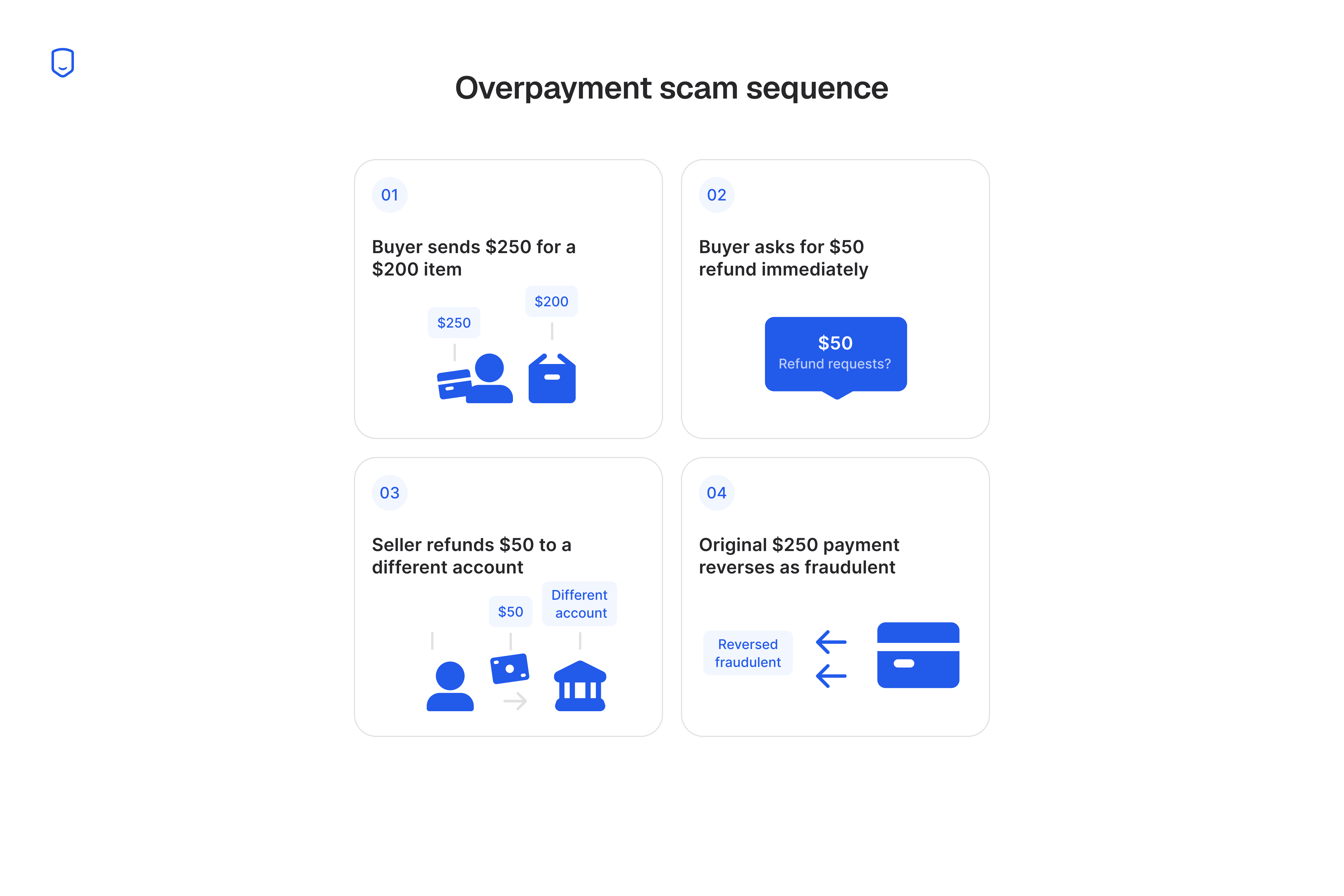
Say you list a $200 item and a buyer sends $250 "by mistake." They ask for the extra $50 back, to a different account, before you've shipped. You never see that $50 again, and the $250 reverses next week.
Consumers reported $12.5 billion in fraud losses in 2024, across every scam type the FTC tracks.
5 red flags that signal a PayPal refund scam
Urgency, a mismatched amount, vague messages, a redirected refund, and a gift-card request are the five signs of a PayPal refund scam. They all come down to how the other person handles the money.
A real buyer who overpays will wait for you to sort it out. A scammer needs you to move first:
- Urgency to refund immediately
- A payment amount that doesn't match
- Vague or evasive communication
- A refund request to a different account or method
- Pressure to use gift cards or wire transfers
Each one is worth knowing on its own, because scammers rarely show all five.
1. Urgency to refund immediately
Pressure to send money back right now is a reliable sign you're being scammed. Scammers push for speed so you act before you check anything.
They rush you because they don't have long. Once someone flags the stolen card, the original payment disappears and so does their payout.
The longer you take to check, the more likely their payment gets caught first. So the message always comes with a deadline, an emergency, or a favor they need today.
A genuine buyer who overpays is usually embarrassed rather than urgent. They'll accept a canceled order or wait for PayPal to sort it out, because nobody is racing them for their own money.
2. A payment amount that doesn't match
A payment that arrives for more than you agreed is the overpayment scam's opening move. In an ordinary sale, nobody sends extra by accident.
The extra money does two jobs for the scammer. It gives them a reason to message you again, and it gives them a number to ask for. That number stays small next to the bigger payment sitting in your balance, so sending it back feels reasonable.
Watch for the reverse version too, where the buyer underpays and then claims they overpaid. It's the same play, and it fails the same test, because the amount doesn't match what you agreed.
Check the figure against your own listing rather than against the buyer's message, since the message is the part they control.
Suppose a screenshot of a payment reads $250. That means nothing if your Activity feed shows $200.
3. Vague or evasive communication
Scam messages stay generic, with no questions about the item and every reply steering back to the payment. The wording barely changes from one attempt to the next.
Scammers work at volume, so they keep their messages generic enough to send to hundreds of sellers. Three tells show up again and again:
- Overly polite filler like "kindly" or "dear" in place of a name
- No questions about size, condition, or shipping
- Every reply circling back to the payment
Someone who genuinely wants your item asks about your item.
Read vagueness alongside the money, since plenty of real buyers write short messages. Vague plus an amount mismatch plus a deadline is a scam nearly every time.
4. A refund request to a different account or method
Any request to send the refund somewhere other than the original payment source is a scam. There's no legitimate reason for it.
A real refund reverses the original transaction, so the money goes back where it came from. Anyone asking you to send it to a new PayPal address, a bank account, or an unrelated card wants a fresh payment out of your own funds. The original transaction sits untouched and reverses later on its own.
This request is also what turns a failed scam into a successful one.
A seller can spot every other flag and still lose the money here, by treating the transfer as a courtesy.
5. Pressure to use gift cards or wire transfers
A refund requested as gift cards, crypto, or a wire transfer is money you'll never get back. Scammers pick those methods because nobody can reverse them.
The FTC's 2024 fraud data shows consumers lost more to bank transfer and crypto scams than all other payment methods combined. Once gift-card, crypto, or wire funds land, no dispute process can reach them.
That's why a scammer works so hard to get you off PayPal.
The Verify-Before-You-Send Check
Confirm the payment in your Activity feed, contact PayPal yourself, and wait for the money to clear before you send any refund. Run them in order:
- Confirm the payment in your Activity feed
- Contact PayPal directly, not via a link
- Wait the standard clearing window before refunding
Each step costs the scammer either speed, trust, or access.
Step 1: Confirm the payment in your Activity feed
Open the PayPal app and find the payment in Activity before you believe any email. Only your Activity feed proves money arrived.
Fake payment-confirmation emails copy PayPal's layout, sender name, and subject line, so scanning your inbox tells you nothing. Your Activity feed is the record PayPal itself keeps.
A payment that isn't there never happened.
Check the amount and the sender against what you agreed while you're in there. Open the transaction itself instead of reading the summary row. That's where the status, the funding source, and the sender's verified name show up.
Step 2: Contact PayPal directly, not via a link
Reach PayPal through the app or by typing paypal.com yourself. Links inside a suspicious message are how the account takeover starts.
A scammer who has convinced you something is wrong will happily hand you the "support" contact to fix it. That link leads to a page built to steal your login. Once they're inside your account, they take the refund rather than ask for it.
Typing the address yourself takes a few seconds and stops the attack before it starts.
PayPal will never ask for your password, your full card number, or a code from an authentication text. Any message that does is a phishing attempt, whatever the sender address looks like, and you can forward it to [email protected] before you delete it.
Step 3: Wait the standard clearing window before refunding
Check the transaction in Activity and wait until it reads Completed with the funds available, rather than Pending or On Hold. You lose a few days. The scammer loses everything.
A fraudulent card or bank account usually gets caught on its own, once the account holder or their bank sees the charge. Every day you wait is a day for that to happen at no cost to you.
A real buyer will usually accept the wait, because they aren't racing a clock.
How long to wait depends on the funding source. A payment from a PayPal balance or an instant transfer settles quickly. One funded by a bank account, an eCheck, or a newly linked card can take several business days to finish clearing, and those are the ones worth waiting out.
The overpayment case has its own order. Cancel the payment while it's still pending, since that reverses the original transaction. Once it has completed, waiting is the only safe move, and any refund goes back to the original method.
Ways to stop PayPal refund scams before they cost you
Refund only to the original payment method, put your overpayment policy in your terms, screenshot every conversation, and run dispute alerts. These are habits you follow without deciding each time, which is what beats a patient scammer who skips the urgency and the odd amount. Four habits stop it:
- Refund through the original transaction. Use the Refund button on that payment in your Activity feed, so you never choose the destination.
- Write your overpayment policy into your terms. State your policy on overpayments, then point to it when someone asks.
- Screenshot the full conversation before any refund. Marketplace threads and PayPal messages disappear when an account is closed.
- Refund as soon as a dispute alert arrives. Acting on the alert ends the case before the chargeback files.
Alerts are the only one of the four that works after you've already shipped.
Imagine you've already shipped an order and the buyer disputes the charge as unauthorized.
A chargeback takes weeks and costs a fee whichever way it lands. An alert reaches you first, while a refund still ends the case quietly. Our own chargeback alerts catch the dispute at that stage.
A written policy can't do that, which is why refunds don't replace alerts at regular volume.
Higher-volume PayPal sellers should also read our guide to PayPal chargebacks for merchants.
Some disputes still reach the chargeback stage. Our guide to disputing a chargeback covers what to send when a case gets that far.
5 common PayPal refund and overpayment scam tactics
The overpayment request, the fake shipping label, the package reroute, the fake screenshot, and the forwarding request are the five common PayPal refund scams. They all use the same trick, and they all end with you sending money that doesn't come back:
- The overpayment refund request
- The fake prepaid shipping label
- Package rerouting after a duplicate payment
- The fake refund-confirmation screenshot
- The wrong-recipient forwarding request
Once you can name the play, you'll see it coming.
1. The overpayment refund request
A buyer sends more than the agreed price, then asks for the difference back. This is the original and still the most common version.
The extra money is the hook. It arrives with an apology and a story about a typo or a mixed-up order. That framing makes the request feel like a favor rather than a transaction.
Honest overpayments do happen, and they look different. A real buyer contacts you about the amount before you raise it, accepts a canceled and re-sent payment, and never specifies where the difference should go.
2. The fake prepaid shipping label
A buyer sends you a prepaid shipping label bought with a stolen account, so the carrier pulls or bills back the shipment. The tell is that the buyer supplies the label instead of letting you buy it.
The label was never yours, so you lose the tracking record too. Your own carrier account is what puts a scan history in your name. That history is the proof PayPal asks for when a buyer says nothing arrived.
Buy your own labels and add the cost to the price. If a buyer insists on supplying one, cancel the sale.
3. Package rerouting after a duplicate payment
A buyer gives a wrong or incomplete shipping address, then redirects the package once it's moving. The reroute leaves you with no proof of delivery.
Your tracking shows the original address, and the carrier logs the redirect under the buyer's name. When they file a dispute claiming the item never arrived, your evidence points to an address the package never reached.
Ship only to the confirmed address on the PayPal transaction and refuse redirect requests. Tell the buyer to cancel and reorder with the correct address, which puts the new address on the transaction record where it protects you.
One version arrives after you've shipped. The buyer calls the carrier directly and reroutes it there. Signature confirmation blocks that, since the carrier needs your say-so to send a signature-required package anywhere new.
4. The fake refund-confirmation screenshot
Someone sends a screenshot showing a payment or refund that never actually happened. Screenshots are trivial to fake.
They want you to hand over the goods on the strength of a picture.
It works because the image looks exactly like the real interface, right down to the transaction ID. The Activity check from step 1 catches this one too.
The same trick runs in reverse on buyers. A seller sends a screenshot of a refund they never issued, hoping you won't file a dispute. Your own record settles it, because a refund you can't see in Activity was never sent.
5. The wrong-recipient forwarding request
Someone sends you money "by accident" and asks you to forward it to a third party. You become the middle step in moving stolen funds.
The original payment is fraudulent, so it reverses, and the money you forwarded is gone from your own balance.
Passing funds along for a stranger can also put your PayPal account under review, because that's exactly what money laundering looks like.
Leave the money where it is. Report it through PayPal's Resolution Center and let PayPal reverse it.
The story attached to these requests is always urgent and always someone else's problem. A stranded relative, a locked account, a payment sent to the wrong person by mistake. The answer stays the same every time, because PayPal reverses a genuine misdirected payment itself.
What to do if you've already sent a refund to a scammer
Report it to PayPal through the Resolution Center right away, then contact your bank if a linked card or account funded the payment. Speed matters more than anything else you do.
PayPal can still trace the money for a short time. Once a scammer moves the funds to an outside account, there's rarely anything left to recover.
Two deadlines run against you, both set by PayPal's buyer protection program:
- 180 days from the payment to open a dispute
- 20 days from opening it to escalate that dispute to a claim
File an FTC complaint at reportfraud.ftc.gov as well, since that's what builds the case against repeat scammers.
Whether PayPal can help you depends on how the payment was sent.
Purchase Protection covers money sent for goods and services only. Scammers push you toward friends-and-family payments because PayPal won't cover those. The payment type you choose matters more than the amount.
The same split decides what a refund you sent is worth getting back. Money you returned as a friends-and-family payment sits outside the program, so the recovery route runs through your bank or card issuer instead of PayPal.
Tell them the payment was obtained by deception and ask what their own fraud policy allows, since that varies by issuer.
FAQ
Does PayPal refund money if you get scammed?
Sometimes. PayPal refunds eligible goods-and-services purchases through Purchase Protection, but it won't get back money you sent yourself as a friends-and-family payment or a refund.
Can you get scammed while receiving a PayPal payment?
Yes, and receiving money is how most refund scams start. The payment lands in your balance, reverses later as fraudulent, and anything you sent back comes out of your own funds.
Is there a PayPal scam going around right now?
Refund and overpayment scams run continuously rather than in waves. The tactics shift a little over time, but the core request has stayed the same for years.
How do you dispute a scam charge on PayPal as a merchant?
Respond through the Resolution Center before the deadline passes, matching your evidence to the dispute type. Send delivery confirmation for Item Not Received, and product photos plus your listing description for Significantly Not as Described.
