
3D Secure (3DS): What It Is, Fraud Prevention Data, Downsides


In our own dataset of disputed transactions, only 9.9% had 3D Secure enabled at the time of the charge. That gap is the story. Most merchants haven't turned it on. Others have learned the hard way. It only solves part of the chargeback problem.
The first thing I check on a merchant's chargeback problem is what the customer saw on their statement. On my own stores, fixing the descriptor beat any single dispute I ever won. By the end, you'll know whether 3DS moves your dispute numbers. Or whether it just adds a step to checkout.
Key takeaways
- Check who holds the card at checkout to cut fraud chargebacks.
- Expect 3D Secure to miss any chargeback that isn't fraud-related.
- Note that 9.9% of our disputed charges had 3D Secure on.
- Move fraud costs to the bank once the check passes, with exceptions.
- Plan for the new 3DS data-field mandate that took effect 1 April 2026.
Getting disputes that 3DS was never going to stop? See how alerts work.
What is 3D Secure?
3D Secure verifies a cardholder's identity during an online card payment before the charge goes through. It works by passing extra data between the merchant, the card network, and the issuing bank.
Sometimes it prompts a one-time code or biometric check. When authentication succeeds, liability for a fraudulent chargeback generally shifts from you to the issuer. It does not prevent non-fraud disputes.
The name counts three domains. There is the acquirer side, your bank. There is the issuer side, your customer's bank. And there is the network in between.
Behind the verification step, the three parties trade data about the transaction. Your checkout sends the device, the browser, the amount, and the billing details.
The customer's bank scores all of it. It then decides whether it knows enough to approve the payment. If not, it asks the cardholder to prove who they are.
That decision is what 3D Secure exists to make.
Authentication is a different job from guarding stored card data, which is where tokenization comes in. One asks whether the right person is holding the card. The other swaps the card number out, so a breach has nothing worth stealing.
3DS runs only when three things line up. The card has to be enrolled. The network has to take part. And you have to switch it on. Turn it on today, and plenty of sales still clear without it.
Types of 3D Secure
Every major card network runs its own branded version of the same protocol. What your customer sees at checkout depends on which card they used. Five brands cover almost all of it:
- Visa Secure, formerly Verified by Visa.
- Mastercard Identity Check, built on EMV 3DS.
- American Express SafeKey, for Amex cards only.
- Discover and Diners Club ProtectBuy, no extra software needed.
- JCB J/Secure, most common in Japan.
Visa Secure is the one most of your customers will meet first.
1. Visa Secure
Visa Secure checks online Visa purchases with a text code, an email, or a security question. Visa shipped the first version of 3D Secure as Verified by Visa. The newer name covers the EMV 3DS version.
2. Mastercard Identity Check
Mastercard Identity Check uses EMV 3D Secure to confirm a shopper's identity on Mastercard payments. It makes a unique token for every purchase. That token ties the check to that one transaction.
3. American Express SafeKey
SafeKey is American Express's version, and it checks cardholders at checkout with a one-time passcode. Your customer sees much the same thing they'd see on Visa Secure. You set it up differently, though.
4. Discover and Diners Club ProtectBuy
ProtectBuy covers Discover and Diners Club purchases and asks for authentication data such as a one-time passcode. Your customer installs nothing for it to work.
5. JCB J/Secure
J/Secure is JCB's version, and it confirms purchases with a one-time passcode. JCB matters most if you sell into Japan or other markets where the brand is common.
How does 3D Secure work?
Your checkout sends the payment's data to the customer's bank. The bank then decides whether to approve it silently or ask. Around 150 data points travel with that request, including the IP address and the amount.
Three pieces make up the mechanics:
- The frictionless flow, where the bank clears the payment silently.
- The challenge flow, where your customer verifies before the sale completes.
- ECI indicators, the codes that record how the check turned out.
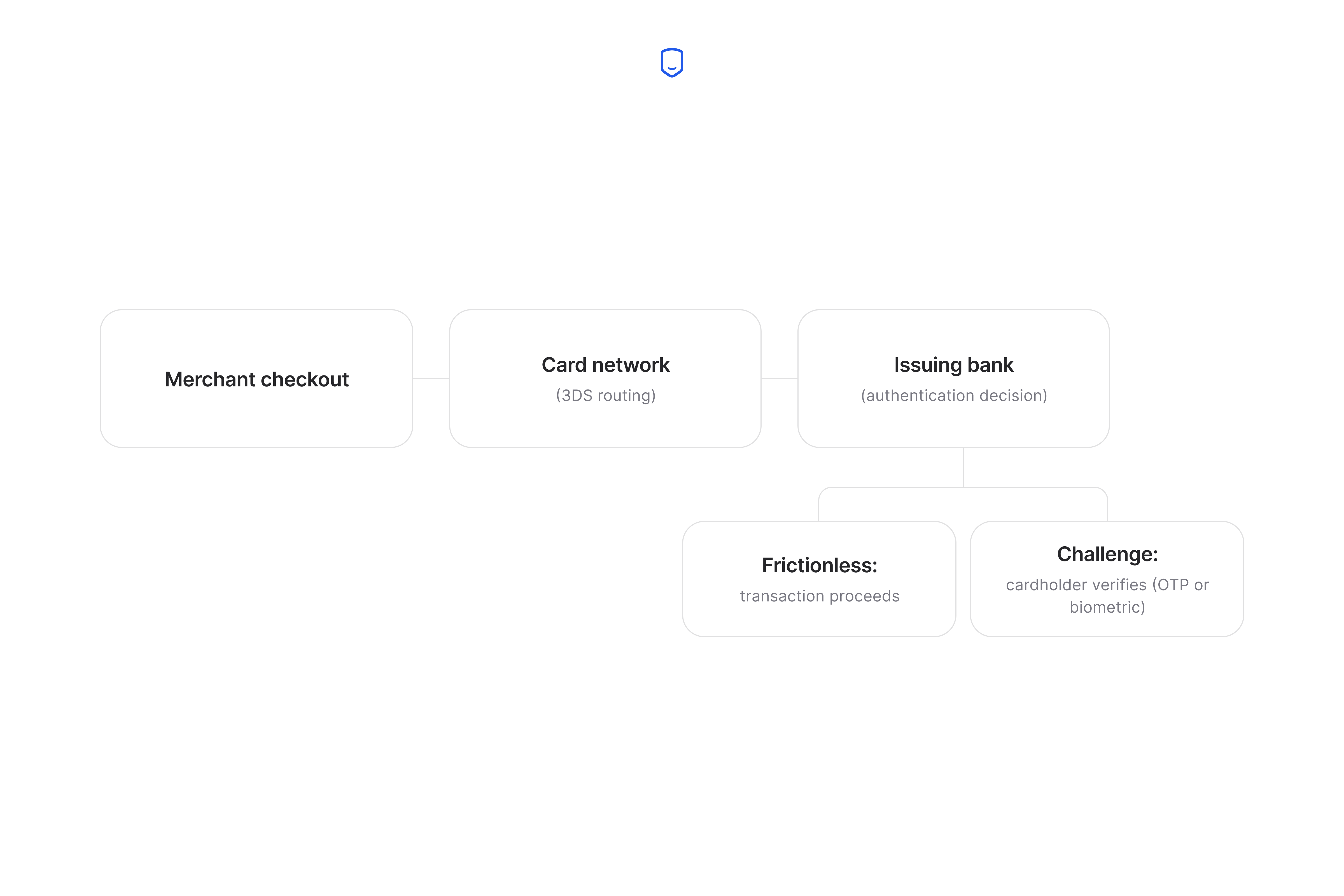
The frictionless flow is the one your customers will hit most often.
1. Frictionless flow
In the frictionless flow the bank authenticates the payment in the background. Your customer never sees a verification screen. They enter their card details, and the payment clears. The confirmation arrives as it would on any other checkout.
The bank gets there by reading the data your checkout already sent. Purchase amount, location, device, and the customer's history with that card all feed a risk read.
When that read comes back low, the issuer approves without asking anyone anything. Your customer gets an ordinary checkout and you still get the check on record.
2. Challenge flow
In the challenge flow the data alone isn't enough, so the bank asks the cardholder to prove who they are. Your customer goes to a secure page. They confirm with a one-time SMS code, a saved password, or a fingerprint. Then they return to your site to pay.
This is where 3D Secure costs you something. Every screen between a buyer and a finished purchase is a place they can stall. They can get confused, or quit.
A challenge adds at least one of those screens.
3. What are ECI indicators?
An Electronic Commerce Indicator (ECI) is a two-digit code that records how the identity check turned out. The Directory Server and the issuer's Access Control Server generate it. It's what tells you afterward whether the check really happened.
Three outcomes matter, and each network writes them with its own numbers:
| Outcome | What it means | Example code |
|---|---|---|
| Successful | The issuer confirmed the cardholder's identity | Mastercard uses 02, Visa 05 |
| Attempted | The card isn't enrolled, but the attempt was recorded | Visa uses 06, Mastercard 01 |
| Failed | Authentication didn't complete | Neither network's protection applies |
Most processors want the ECI in the authorization request. Leave it out and you risk fines, your account, or your ability to take cards at all.
Your acquirer also reads this code when deciding whether the liability shifted on a disputed charge.
Troubleshooting: 3D Secure authentication failures
When a 3D Secure check fails, the sale usually goes through anyway, and you lose the liability shift on it. What happens next depends on whether the network required 3DS for that payment.
Sometimes 3DS isn't required and the check can't complete. The payment then usually runs as an ordinary card transaction. Stripe's 3D Secure documentation puts it plainly.
"If a card doesn't support 3DS or an error occurs during the authentication process, the payment proceeds normally."
The sale lands in your account and looks like every other sale. That is why nobody notices the failure.
Your position on that charge is weaker than it looks.
Stripe continues, "When this occurs, liability doesn't generally shift to the issuer, because a successful 3DS authentication hasn't taken place."
So you have an unchecked sale that you've been counting as a protected one.
So a run of failed checks that still converted is a warning worth acting on.
Pull the ECI values on your recent 3DS-flagged charges. Count how many came back failed or attempted rather than successful. A rising count is worth tracing to a single issuer, a card type, or a recent change in your checkout integration.
Does 3D Secure prevent chargebacks?
3D Secure prevents fraud-coded chargebacks, and it does nothing about disputes from customers who really made the purchase. That second group is a large part of what most merchants face:
- Non-delivery, where the order never arrived.
- Unhappy buyers, where it arrived and disappointed.
- Billing confusion, where nobody recognized the charge.
- Processing errors, like a duplicate charge.
- Friendly fraud, where the buyer disputes anyway.
3D Secure answers one question. Does the person holding the card own it? A passed check confirms the buyer. A late package is a separate dispute reason entirely.
In our dataset, only 9.9% of disputed transactions had 3D Secure enabled at the time of the charge, while 90.1% did not.
Most disputes our platform sees were never candidates for the protection.
Size this for yourself. Pull your last 90 days of chargebacks. Check each one against our reason code lookup. Whatever share carries a fraud code is the most 3D Secure can take off your total.
Two things can still leave you liable on a clean charge, covered next.
Chargeback alerts close the rest of the gap. They tell you a dispute is coming, so you can refund the customer first.
Liability shift: who's on the hook after 3D Secure
When 3D Secure works, the cost of a fraud chargeback moves from you to the bank that issued the card. Stripe states the rule plainly. "If a cardholder disputes a 3DS payment as fraudulent, the liability typically shifts from you to the card issuer."
Read the word "fraudulent" carefully. It limits the protection. A customer filing under non-delivery leaves you liable whether or not the payment passed.
Two named exceptions narrow it further. The first is your own fraud record, in Stripe's own words.
"This is rare and can happen, for example, if you have an excessive level of fraud on your account and are enrolled in a fraud monitoring program."
The second is what you sell, per Stripe's own documentation cited above:
"Visa doesn't support liability shift for businesses engaging in wire transfer or money orders, non-financial institutions offering foreign or non-fiat currency, or stored-value card purchase or load."
This is a different rule from the EMV liability shift. That rule moved counterfeit-card losses to whoever hadn't adopted chip cards.
Ignoring an inquiry costs you protection you already had.
A dispute inquiry on a 3DS-checked charge is only a request for information. Leave it unanswered and the bank can raise a "no-reply" chargeback that invalidates the shift. Answer it with what was ordered, how it shipped, and who received it.
Benefits of using 3D Secure
Beyond the liability question covered above, 3D Secure earns its place for four more reasons. Those reasons span regulation, retention, issuer trust, and cost. They're worth different amounts to different merchants:
- PSD2 compliance, which is mandatory rather than optional in the EU.
- Less churn from a checkout customers trust.
- More credibility with issuing banks.
- Interchange benefits on some acquirer agreements.
1. PSD2 compliance
In the EU, the Revised Payment Services Directive (PSD2) requires Strong Customer Authentication on most electronic payments. 3D Secure is how merchants meet it.
Strong Customer Authentication means two factors confirming the payer's identity, and 3DS supplies exactly that.
In Europe the law requires it, so this one sits outside your control. Similar authentication mandates apply in the UK, India, Singapore, Malaysia, Nigeria, Bangladesh, and South Africa. Most processors handle PSD2 and PCI DSS compliance in the same review with you.
2. Less churn from disputed-account friction
When the issuer does challenge, a visible verification step reassures buyers who've been burned by card fraud before. They read it as your store taking their money seriously.
The catch is that the same step costs you conversions when it interrupts. This benefit and the friction cost are the same event, seen from two sides.
3. Increased credibility with issuers
Checked payments read as lower risk to the banks approving them, which can help your approval rates. A bank weighing whether to approve a payment looks at whatever it can. A passed check counts in your favor.
This still helps where 3DS is optional. In markets that mandate it, every merchant already authenticates, so it stops setting you apart.
4. Interchange-rate benefits
Some acquirers charge lower interchange on checked payments, because they are cheaper for the bank to carry. Interchange fees are what you pay card issuers and banks on every sale. A rate change adds up fast.
Ask your acquirer whether your deal prices checked payments differently, because only some do. The ones that do often set volume or category conditions first.
Potential downsides of 3D Secure
3D Secure trades checkout friction for fraud protection, and on 2.0 almost all of that friction lands on challenge flows and cross-border sales. A silent check costs your customer nothing. A verification screen costs you some of them.
Fraud-prevention vendor Ravelin measured how expensive that used to be. It sampled transactions between February and March 2022, before most major cards adopted 3DS 2.0 that October:
| 1.0-era friction | Measured |
|---|---|
| Payments lost to extended wait times | An estimated 22% |
| Extra time added per purchase | About 37 seconds on average |
| Transactions clearing frictionlessly | Only 9% |
Nearly every 3DS customer in that window got the slow path.
The friction is still worst on cross-border sales. Bank support varies by country, so a card that clears in seconds at home can stall abroad. Your customer ends up calling their bank from a hotel to finish a purchase they already wanted.
How to activate 3D Secure for your business
Ask your acquirer or gateway to switch 3D Secure on, install any plugin they specify, then set your trigger rules. They handle the network integration. What you're deciding is scope. Four steps:
- Contact your acquirer or gateway and ask what enabling 3DS involves on your account.
- Install any plugin or SDK update they specify for your checkout platform.
- Choose your trigger rules, either 3DS on every transaction or only above a risk or amount threshold.
- Confirm ECI values are passing in your authorization requests before you rely on the protection.
Set the rules too tight or too loose and you lose money either way.
Requiring a check on every payment covers the most fraud. But every avoidable challenge you fire costs conversions. A threshold set too high hands you unchecked high-value orders.
Most merchants start with 3DS above an order-value threshold rather than on every payment. Watch your fraud-coded disputes and your checkout completion rate side by side for a month. Then lower the threshold if fraud disputes stayed flat, and raise it if completion dropped.
3D Secure 1.0 vs. 3D Secure 2.0
3DS 2.0 replaced 1.0's redirect-and-password checkout with a flow that authenticates most payments silently. Version 1.0 pushed your customer to a separate page. It asked for a password they'd probably forgotten. Version 2.0 keeps them in your checkout and asks most of them for nothing.
The difference comes from how much the issuer gets to see.
2.0 sends far more context up front, covering the device, the session, and the customer's card history. That is what lets the bank clear a payment without a challenge.
The two versions differ on four things:
| 3D Secure 1.0 | 3D Secure 2.0 | |
|---|---|---|
| Where the check happens | A separate redirect page | Inside your checkout |
| What the customer does | Types a static password | Usually nothing |
| Data sent to the issuer | Minimal | Device, session, card history |
| Surfaces covered | Browser only | Browser, in-app, wallets, wearables |
Payments-compliance sources, including PCI Proxy, report that Mastercard updated its 3DS data requirements on 1 April 2026. That matches fields Visa mandated back in August 2024.
Shufti Pro says each request should now carry a cardholder name, a billing address line, one contact method, and a device ID. We couldn't reach Mastercard's own rules to confirm it. Ask your processor what it needs.
The networks are retiring 1.0 on their own schedule. A merchant still on the old version has a deadline they didn't set.
How we sourced our data
The 9.9% and 90.1% figures come from anonymized, aggregated alert data across merchants enrolled on the Chargeback.io platform. They describe our platform's dispute population, so read them as a picture of the merchants we protect.
We looked at whether the disputed transaction behind each alert had 3D Secure enabled at the time of the charge. We report the result as a share of alerts with a recorded 3DS status. Category totals publish only as shares.
Our alert coverage is strong on Visa and Mastercard and thinner on American Express, JCB, and Discover.
FAQ
How do I know if I have 3D Secure?
Look for a network badge at checkout, like Visa Secure, Mastercard Identity Check, American Express SafeKey, JCB J/Secure, or Discover ProtectBuy. Your issuing bank can also confirm enrollment.
Do all credit cards have 3D Secure?
Visa, Mastercard, and American Express include it by default, and support outside those networks varies by issuer. It's mandatory for online payments in the EU and several other countries, and optional in most of the rest.
How do I activate 3D Secure as a cardholder?
Most issuers enroll cards automatically under the current version, so there is usually nothing for you to switch on. If your bank still uses an older setup, look under card security settings in your online banking or mobile app.
What should I do if my card isn't enrolled in 3D Secure?
Call your issuing bank and ask them to enroll it, since enrollment is controlled by the issuer rather than the merchant. Until they do, expect declines on merchants and in countries that require authentication.
Does 3D Secure slow down checkout?
Usually no, because 3DS 2.0 checks most payments silently in the background. Customers only notice when the issuer asks for a code or a fingerprint, which happens on higher-risk purchases.
